Showing posts with label Nvidia. Show all posts

Xiaomi launches the Mi Notebook Pro


Xiaomi had a product launch yesterday and what has been announced include the Mi Notebook Pro, Mi Mix 2 and Mi Note 3. First, we shall have a look at the Mi Notebook Pro, Xiaomi's vision of the best laptop that would face against the Apple MacBook Pro.


Mi Notebook Pro


In terms of design, we can see that the Apple's MacBook Pro is the source of inspiration for the Mi Notebook Pro. As a result, what we have here is a laptop that looks classy and minimalist. The chassis is made of magnesium alloy and weighs at 1.95kg. It comes with a 15.6-inch narrow bezel display which is protected by Corning Gorilla Glass 3. The IPS panel covers 72% of the NTSC colour gamut and only comes at 1080p display resolution.


Apart from that, the Mi Notebook Pro also packs with a tonne loads of features.


Highlights:
  • 8th generation Intel Core i7/i5 processor
  • NVIDIA GeForce MX150 GPU (mobile version of GT 1030)
  • Dual-channel RAM
  • PCle high-speed SSD
  • Full metal body with 7 integrated ports
  • High-depth keyboard, premium backlighting
  • 3rd gen Corning Gorilla Glass


Xiaomi is offering the Mi Notebook Pro in 3 different configurations:
  • i7-8550U + 16 GB RAM: RMB 6999 (~RM 4498)
  • i7-8550U + 8 GB RAM: RMB 6399 (~RM 4112)
  • i5-8250U + 8 GB RAM: RMB 5599 (~RM 3598)
The laptop will go on sale in China-only from 15th September 2017 and ships with Microsoft Windows 10 (Chinese edition). No words on the availability in the overseas.

Source: MIUI Forum

MSI GE62VR 7RF Apache Pro Gaming Notebook Review


In case if you haven't notice, NVIDIA has removed the M moniker for Pascal GPUs in gaming notebooks. NVIDIA recently made a bold claim that its Pascal architecture is so energy efficient and it will perform just as good regardless of the system that it's running on.  
In this review, we will test that out with the MSI GE62VR 7RF Apache Pro gaming notebook here at Tech Critter's lab, special thanks to MSI Malaysia Notebook for the provision of the review unit.

(The MSI GE62VR 7RF Apache Pro gaming notebook is retailed at RM7699)

Overview


While it might appear to be a bulkier choice compared to the thinner and lighter MSI GS63VR 6RF Stealth Pro, the bigger chassis allows a more powerful cooling system to be packed into the MSI GE62VR 7RF Apache Pro.


The hinge design on the GE62VR 7RF doesn't allow you to lay it completely flat, but it's more of a personal preference that doesn't really make much difference when it comes to gaming performance.  


Like the rest of MSI gaming notebook lineup, the GE62VR 7RF comes with usual aesthetics i.e brushed metal texture and the glowing MSI Gaming Dragon logo.  


The keyboard is again prepared by SteelSeries, but compared to the previous generation of MSI gaming notebooks, the revised design aka Silver Lining Print gives more light exposure through the translucent side of the key caps for better aesthetics. 


As usual, the Cooler Boost button to ramp up the fan speed for better cooling performance can be found right next to the power switch. 


Front view with the lid closed, notice that there are 3 LED indicators for the system and drive activity. The meshes on each side left and right is where the stereo speakers located at.


On the left, you'll find 2 x USB 3.0 port and 1 x USB 3.1 type-C port for your USB storage needs, audio jacks for headphones and microphones, Killer E2500 Gigabit Ethernet port for network traffic protection and prevents lag spikes, HDMI port and a mini DisplayPort for external display monitors.


There's nothing much here on the right though, 1 x USB 2.0 port, SD card slot and an optical drive for those who might still need it.


While there are no additional I/O ports at the back of the GE62VR 7RF, you do get the rear exhausts design that directs the heat out from the chassis to the back instead of the sides.


At the bottom of the GE62VR 7RF, you'll find the grill-like design ventilation holes for the middle section that is similar to the previous generation. These are meant to provide ventilation for better cooling performance. 

Upgrading the components such as memory kit, SSD or MXM module is easy with this chassis, but doing it on your own will void the warranty as it requires you to remove the warranty sticker that covers one of the screw holes. It is advised to bring it over to an MSI certified service centre to perform the upgrade if you did not wish to void the 2-year limited warranty covered by MSI Malaysia.

The Display


The viewing angle of the GE62VR 7RF's screen looks decent we'd say, as you can barely notice any odd symptoms from the 4 common different angles such as colour distortion. 

Software: MSI Dragon Center


The pre-installed MSI Dragon Center is something similar to the MSI Dragon Gaming Center software that we've seen on the previous generation MSI gaming notebooks, a handy tool that allows user to monitor the system status, customize the keyboard lighting and LED color, toggle system performance and more - Aside from the new look, the user interface much more organized and intuitive now.

Gaming Test


The GS62VR 7RF packs the latest NVIDIA GTX 10 series graphics, the GTX 1060 6GB with a slightly reduced performance for gaming notebooks. In our controlled test, we've gone through some selected titles in our library separately, with the GTX 1060 on stock clock and overclocked settings ( 125MHz on the GPU Clock and 200MHz on the memory clock).

Do note that the listed average frames per second (FPS) above is the result of the selected titles on its highest settings. We intended to find out just how capable the gaming notebook is when it comes to handling games, so there's no need to hold back with the game settings.

Key Rollover Test


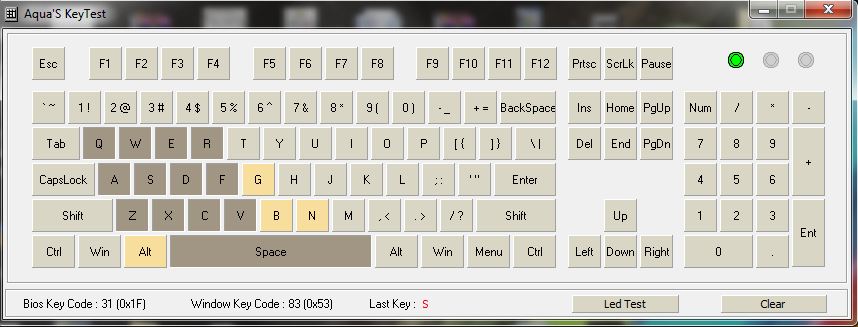
As we have mentioned earlier that the key rollover feature has been greatly improved this time, here's a preview of the keys registered via the Aqua Key Test tool from OTD.kr. Some might find this insignificant, but for a gaming notebook which its keyboard is prepared by a gaming peripherals company, we find this is necessary. 


Starting off with the key matrix, unlike most ordinary, non-gaming notebooks out there, the GE62VR 7RF keyboard is able to register more keys to support games that requires more keys to be registered at the same time.


And of course, the key matrix does support the commonly used rows of keys for rhythm games as well. 


Audio Test


Audio quality wise, the GT62VR 7RF did as expected with its Dynaudio speakers. The speaker alone delivers clear and powerful sound stage, along with a decent amount of bass for not just gaming, but music and movies as well without any audio enhancement from the Nahimic 2 software. 

Of course, the software changes the audio quality significantly when it's activated, this shows that the speakers on the GT62VR 7RF are actually pretty good.


Battery Life


The GS62VR 7RF didn't last long under heavy usage for games with battery alone. It lasted for approximately 1 hour and 8 minutes before shutting down itself due to low power. We managed to squeeze 3 hours while running under power saver mode for lightweight usage i.e document processing, reading, web browsing.

Final Thoughts

For gaming performance, we manage to get some pretty impressive numbers with the GE62VR 7RF running selected AAA titles with the highest settings for each title. Although there is a 10% to 15% reduction in performance, we'd say that it's still within the reasonable range to what the desktop version of the GTX 1060 is capable of. Gaming on the battery alone is definitely not recommended, as it is impossible for the GTX 1060 to perform at its peak even with the new BatteryBoost. Battery life is still lacking, but that's common for every gaming notebook and we haven't seen anyone actually coming up with a permanent solution for that.

Cooling performance is excellent and we have nothing much to complaint about except for the slight increase in noise as the result for both cooling fans operating at maximum speed. If you're worried that having the cooling fans operating at maximum speed will encourage faster dust build up, have no fear as removing the bottom cover to clean up the cooling fans is as easy as pie. 


Price wise, the MSI GE62VR 7RF Apache Pro is retailed at the price of RM7,699, which is rather high for those who is
 limited by budget. Still, it's a choice Gamers on the go who doesn't actually need a powerful GPU like the GTX 1080 but still needs some extra cooling performance. Of course, if the bulkiness doesn't bother you.  

Pros
  • Very decent cooling performance with CoolerBoost
  • Decent graphics performance
  • Good overall audio performance
  • Keyboard with gaming optimized key matrix 
  • Consider to be future proof with USB Type-C MSI SuperPort (Thunderbolt 3) port
Cons
  • Still cost a bomb
  • Limited battery life on high performance mode
  • Bulky, not easy to carry around
ASUS 2017 ZenBook and VivoBook series now in Malaysia

ASUS 2017 ZenBook and VivoBook series now in Malaysia

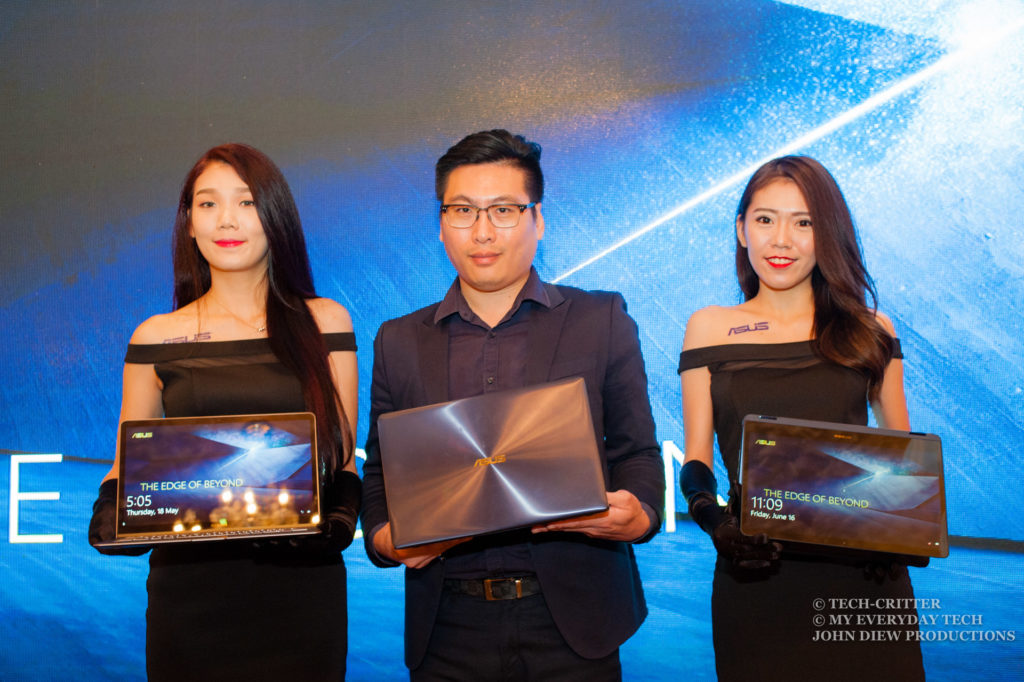
ASUS Edge of Beyond

Two weeks ago, during the Computex 2017, ASUS has unveiled 5 new laptops across the ZenBook and VivoBook series. Today, ASUS Malaysia is proud to announce that Malaysia will be the first country to receive the new laptops.


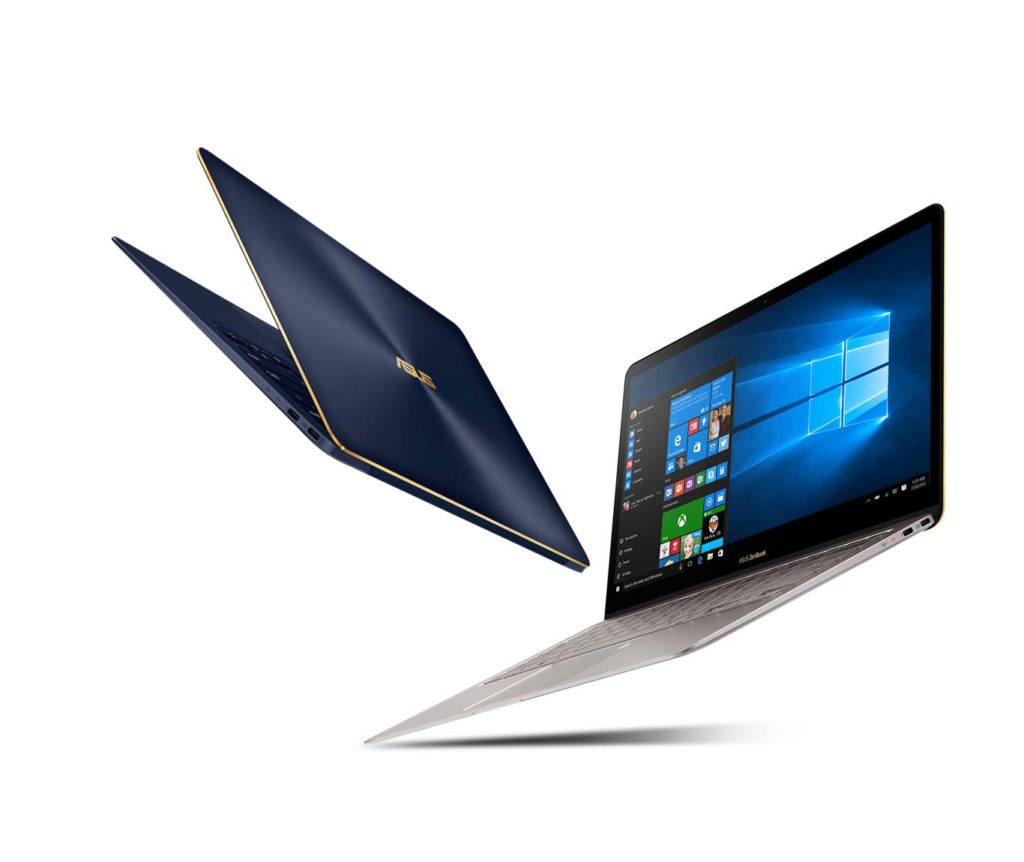
ASUS ZenBook 3 Deluxe (UX490)


The ASUS ZenBook 3 Deluxe is the winner of a Computex 2017 d&i Award. The all-aluminium ultrabook is as thin as 12.9 mm and weighs 1.1 kg. While it may seem to be a 13-inch ultrabook, but it actually houses a 14-inch NanoEdge display thanks to the ultra-narrow bezel.
  • Thinnest 14-inch laptop, 12.9 mm & 1.1 kg
  • FHD NanoEdge display with 84% screen-to-body ratio, 100% sRGB
  • 7th Generation Intel Core i7-7500U processor
  • 16GB of 2133MHz LPDDR3 RAM
  • up to 1TB PCI Express SSD
  • two USB Type-C with Thunderbolt 3-enabled
  • Windows 10 with One-touch login and Windows Hello
  • Harmon Kardon certified audio with quad speakers and Smart Amp
  • Backlit keyboard with glass cover touchpad
SRP - RM 8299
Available now

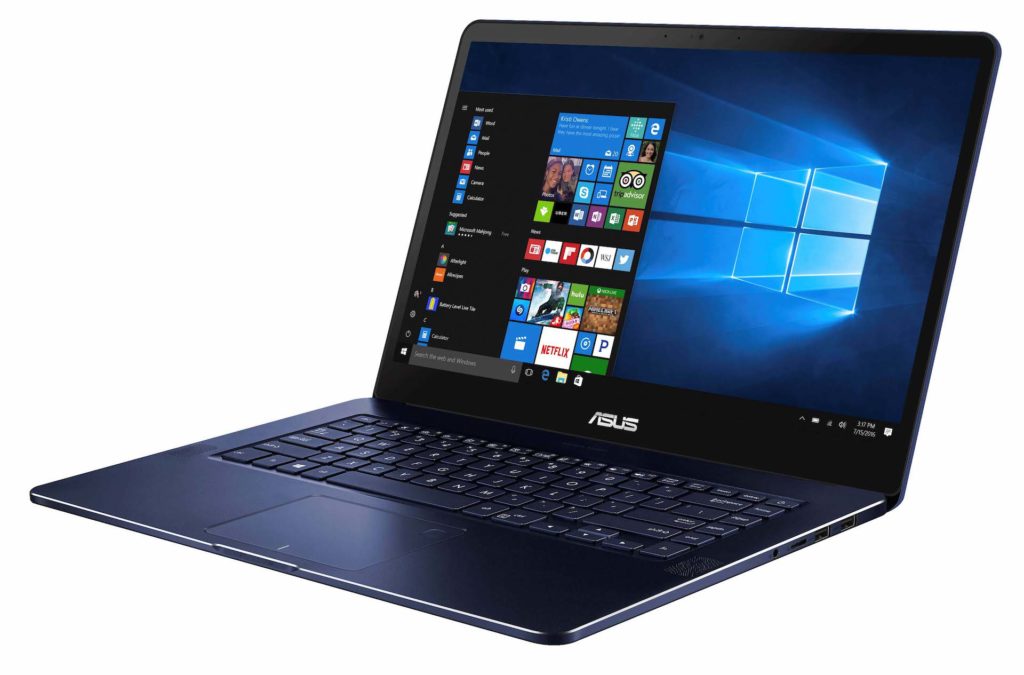
ASUS ZenBook Pro (UX550)


The new ASUS ZenBook Pro as the winner of a Computex 2017 Best Choice Award, it offers professional users an ultrabook with the combination of serious performance and supremely elegant design.
  • 18.9 mm, 1.8 kg
  • 15.6-inch FHD NanoEdge display
  • 7th Generation Intel Core i7-7700HQ quad-core processor for notebooks
  • NVIDIA GeForce GTX1050 graphics
  • 512 GB PCIe x4 SSD
  • 16 GB RAM
  • 14-hours battery life with fast charge 60% in 49 minutes
  • Windows 10 with One-touch login and Windows Hello
  • Harmon Kardon certified audio with quad speakers and Smart Amp
SRP - RM 7299
Availability - beginning of August 2017

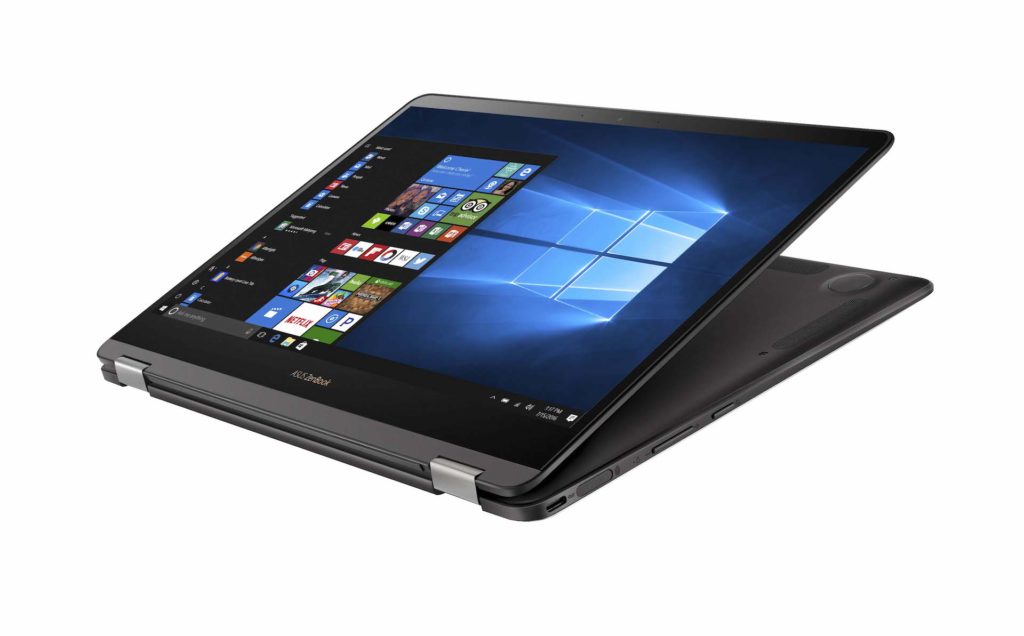
ASUS ZenBook Flip S (UX370)


The ASUS ZenBook Flip S is also the winner of a Computex 2017 d&i Award. It is the world’s thinnest convertible laptop, and also one of the lightest. Combining elegant sophistication with the convenience and versatility of a 360° flipping display, this ultrathin convertible is only 10.9mm thin and 1.1 kg light. The innovative 360° ErgoLift hinge has a dual-action mechanism that lifts and tilts the keyboard into the perfect typing position when the display is opened beyond 135°.
  • Thinnest convertible - 10.9 mm, 1.1 kg
  • FHD multitouch NanoEdge display with 360-degree hinge
  • 7th Generation Intel Core i7-7500U processor
  • 512GB PCIe SSD
  • 16 GB RAM
  • Windows 10 with One-touch login and Windows Hello
SRP - RM 6699
Availability - beginning of August 2017

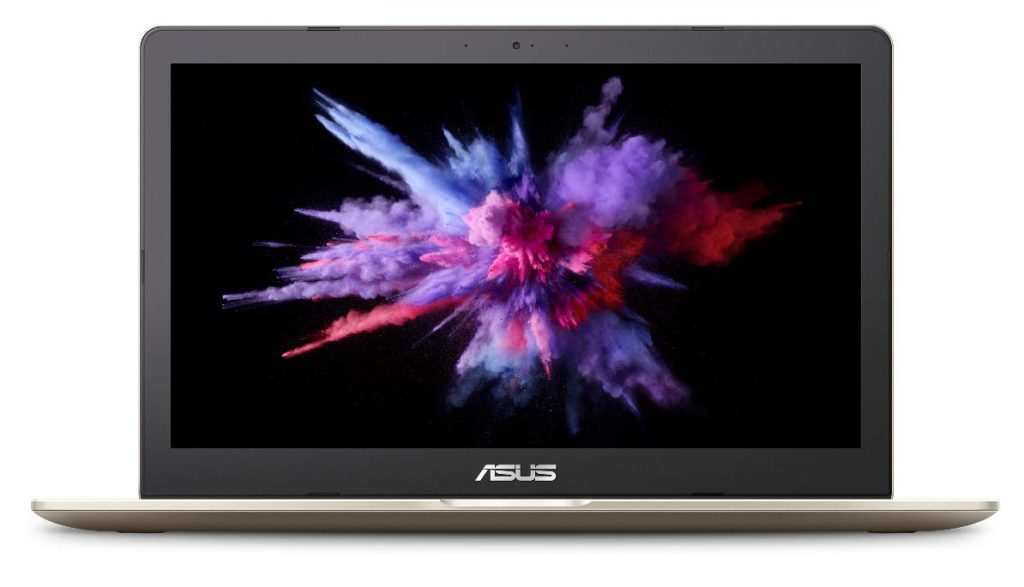
ASUS VivoBook Pro (N580)


The VivoBook Pro while may not be as lightweight and portable as the ZenBook series but they compensate it with higher processing capabilities.
  • 19.2 mm, 2.2 kg
  • 15.6-inch FHD display with wide-view technology, 100% sRGB
  • 7th Generation Intel Core i7-7700HQ quad-core processor
  • 16 GB RAM
  • NVIDIA GeForce GTX 1050 graphics
  • Harman Kardon-certified audio, including twin speakers with large 8cc audio chambers and smart-amplifier technology for 3.2X louder volume
SRP - RM 4799
Availability - beginning of August 2017

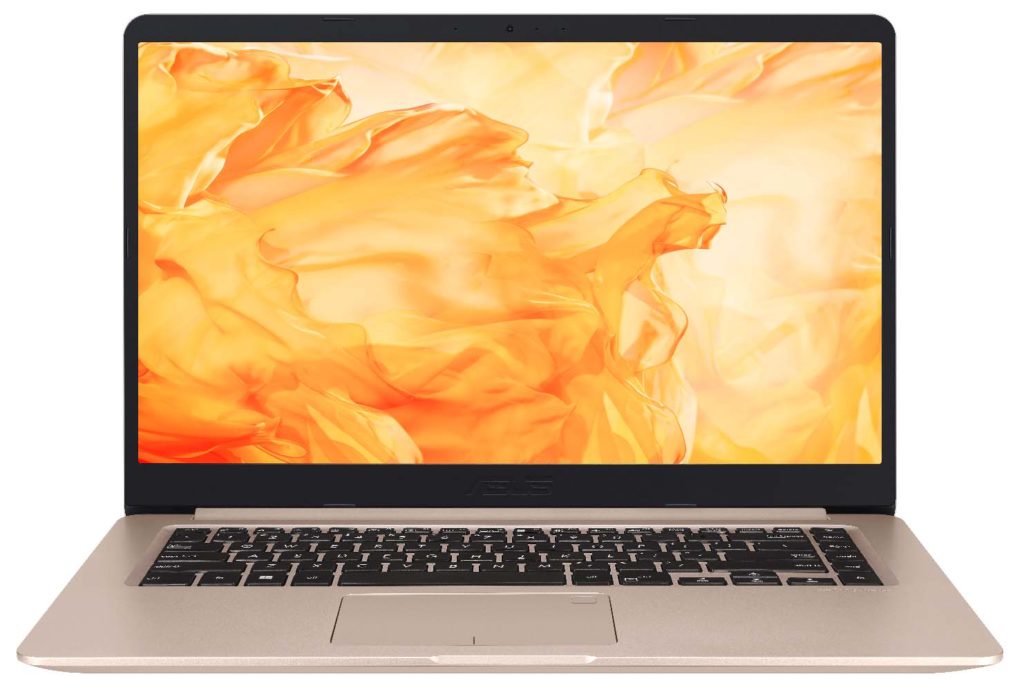
ASUS VivoBook S (S510)


ASUS VivoBook S15 is the latest and most premium model in the VivoBook Series.
  • 17.9 mm, 1.5 kg
  • 15.6-inch FHD NanoEdge display
  • 7th Generation Intel Core i7-7500U processor
  • 16 GB RAM
  • NVIDIA GeForce 940MX graphics
SRP - RM 3699 (i7) & RM 2899 (i5)
Availability - beginning of July
Zephyrus is ASUS ROG's Ultra Slim Gaming Laptop with GTX 1080

Zephyrus is ASUS ROG's Ultra Slim Gaming Laptop with GTX 1080

Zephyrus

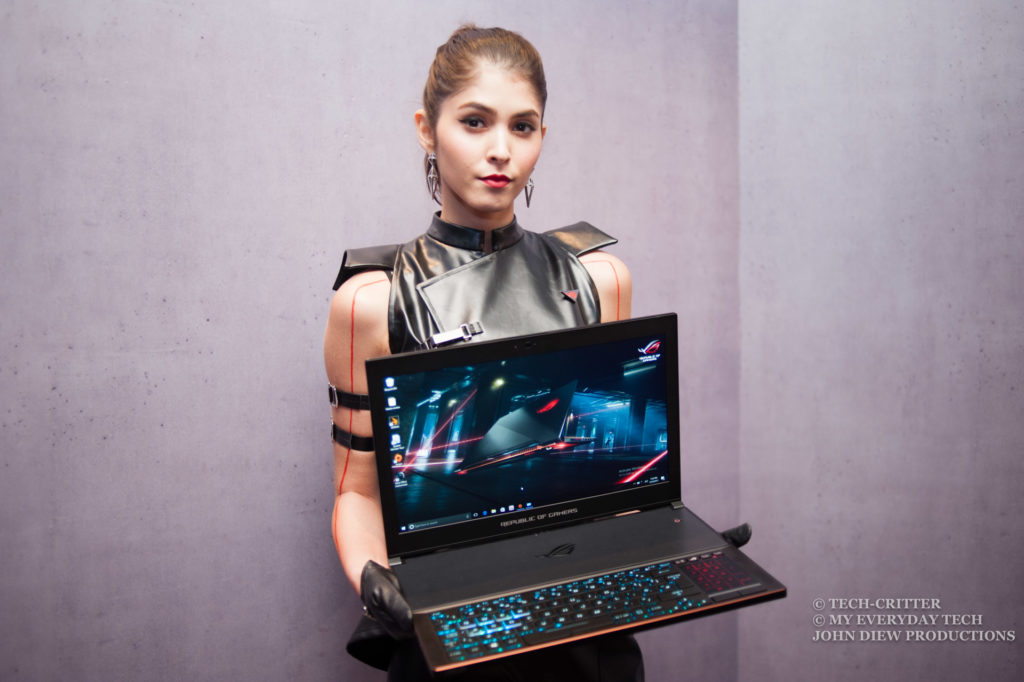
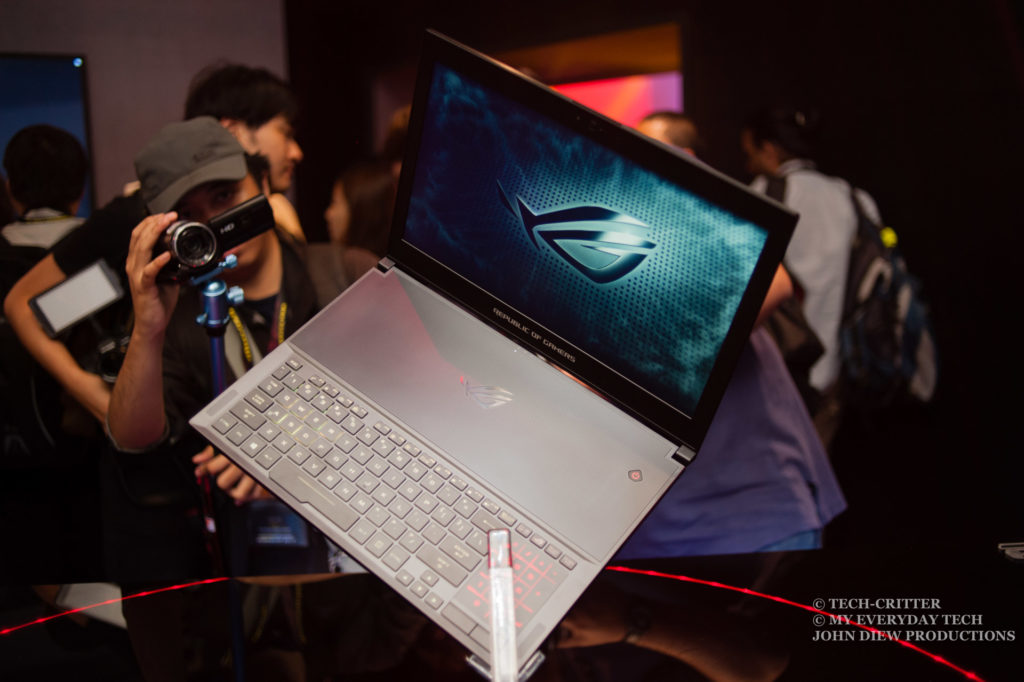
The ASUS Republic of Gamers today has made official their latest gaming laptop - Zephyrus. It is the world's slimmest gaming laptop that features 7th generation Intel Core i7 and NVIDIA GeForce GTX 1080 GPU.


ASUS ROG Zephyrus general specs

  • Intel Core i7-7700HQ
  • NVIDIA GeForce GTX 1080
  • up to 24 GB DDR4 2400 MHz
  • M.2 PCIe x4 256 GB / 512 GB / 1 TB SSD
  • 15.6-inch Full HD wide-view panel with anti-glare, 120 Hz with NVIDIA G-SYNC
  • Connectivity
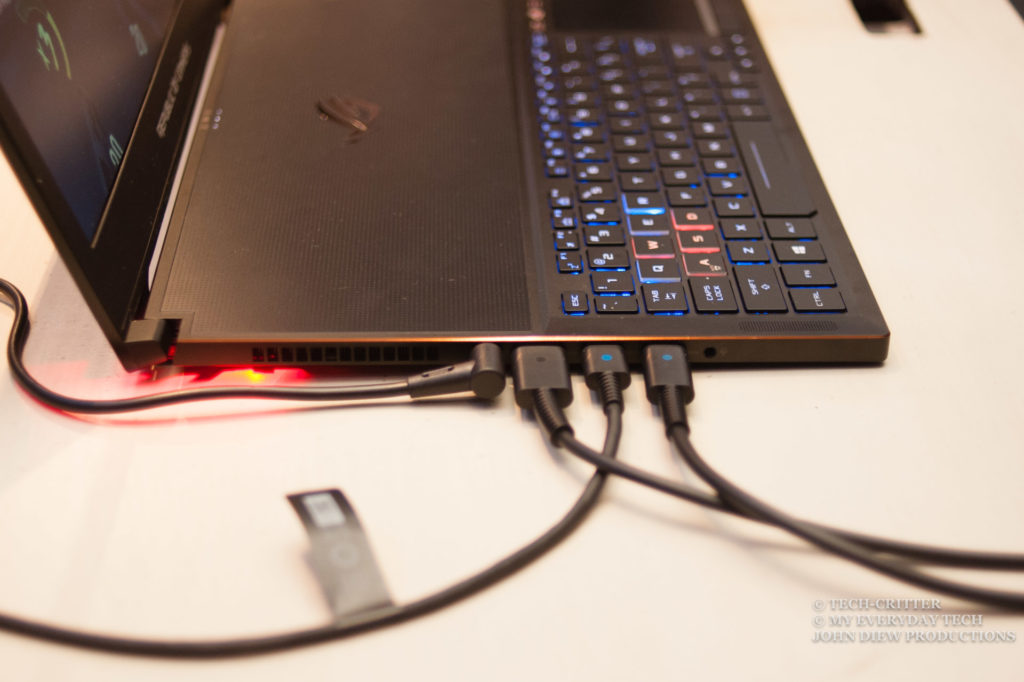
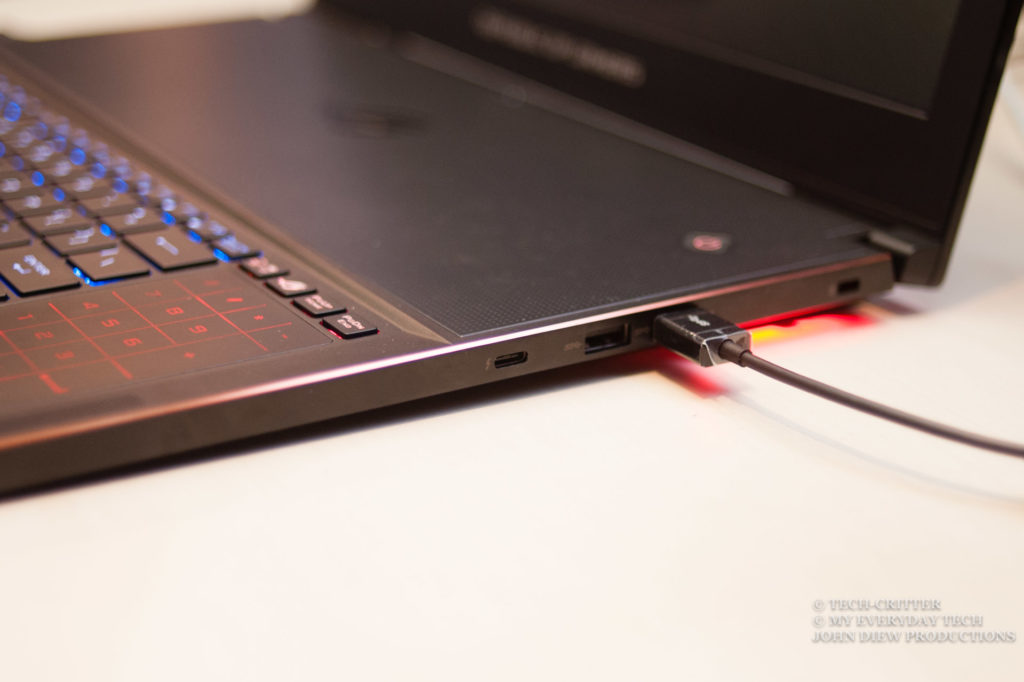
    • 1 x USB 3.1 Gen 2 Type-C™ with Thunderbolt™ 3
    • 4 x USB 3.1
    • 1 x HDMI 2.0
    • 1 x 3.5mm headphone and mic combo jack
  • SUS Aura RGB backlit chiclet keyboard with 30-key rollover; 1.4mm key travel
  • 4-cell, 50 Wh battery
  • 37.9 x 26.2 x 1.69 cm
  • 2.2 KG (with battery)

ROG-exclusive design and cooling system

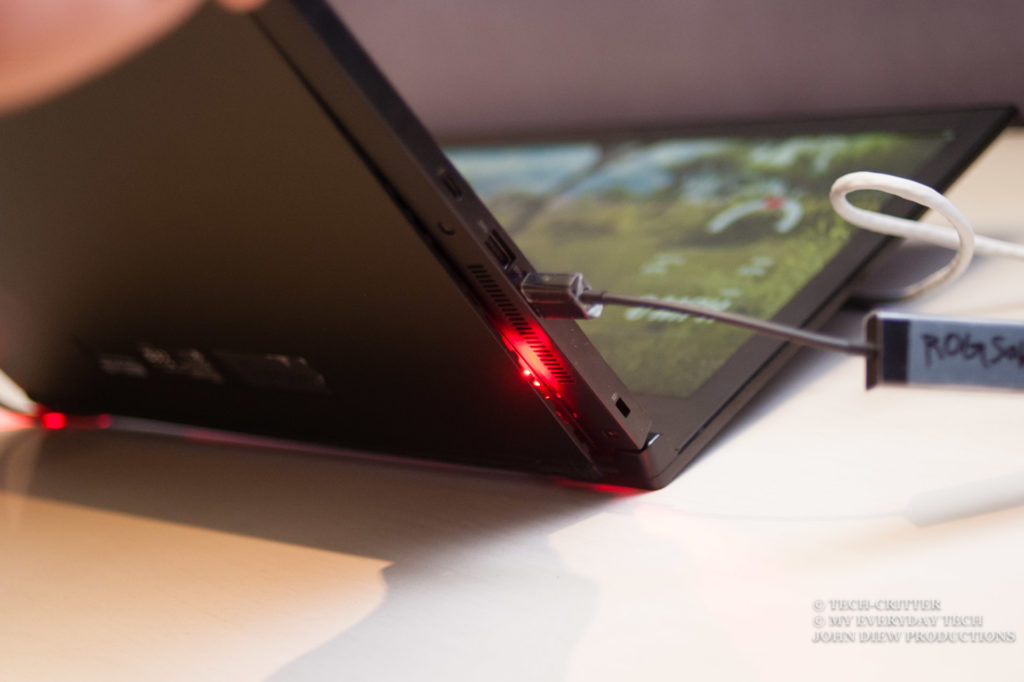
The ROG Zephyrus is cooled by an exclusively designed Active Aerodynamic System (AAS) that increases the efficiency of the airflow through the laptop. The fan's surface cover and accelerator are 3D-curved to enhance the airflow that ultimately helps remove the heat more efficiently. As shown in above image, when the Zephyrus' lid is opened, the bottom chassis flexes open to increase the airflow by 20% which further increases the air circulation.


The ASUS Aura RGB keyboard is also positioned at the front of the chassis to allow better cooling of the internal components. Honestly speaking, having all those high-end components stuffed into a chassis as thin as 16.9mm is not an easy task as you need to address the biggest issue of all - the heat.


Pricing & Availability

There is no news on the pricing and availability yet at the moment, but we will be sure to update you the soonest as we get the information.

ASUS ROG XG Station 2 Review


Having a gaming notebook isn't always the best solution for gamers on the move as some prefers to have all the fun at home and focus on their work when they're outside. Instead of purchasing a gaming notebook, there are a small group of enthusiasts who modified their mobile devices to work with external graphics adaptors so they can enjoy that extra performance boost with any graphics card that they can get their hands on.


While these external graphics adaptor mods are able to breath new life to any notebooks and all-in-one devices with less powerful GPU, not everyone is capable of such feat due to limited knowledge in the parts that they're dealing with.

There are quite a few known brands that provide easier solutions with ready made, plug and play external graphics adaptor for the non-technical users. ASUS is one of the many, with their GeForce 8600GT powered XG Station for this purpose. Of course, we're not going to look at the XG Station in today's review, but instead, the new ASUS ROG XG Station 2 that is capable of supporting the latest NVIDIA GeForce and AMD Radeon graphics cards.


Specifications


Unboxing


The ROG XG Station 2 ships in a huge box, which really surprised us at first as we weren't expecting for it to be this big. If you're planning on carrying this back from the store, we recommend that you're driving.


Right out of the box, you'll get the a gorgeous looking ROG XG Station 2 with the usual Mayan-inspired patterns around its enclosure. It's appearance somewhat reminded us of the ROG G20 in a stretched form. 


The side view of the ROG XG Station 2. On the left, you'll find a display window that is made for graphics card showcase,  the shroud design in particular. The other side is a opaque side which the 60 PLUS gold 600W power supply resides at.


The ROG XG Station 2 can be connected or disconnected from your notebook or PC without having to restart the device. It comes with 4 x USB 3.0 ports and a Gigabit Ethernet port for simultaneous keyboard, mouse, VR headset, monitor, and internet connectivity, providing all the connectivity you need while gaming on it.


How the inside looks like. You'll have an array of LEDs for light show, in case you need that rainbow color cycle as a mood lifter. 


Although it has all the fancy features, LEDs etc, the ROG XG Station 2 only allows a single GPU configuration like most of the external graphics card alternative you'll find on the market. Do note that the PCIe slot uses a side push lock design due to the limited space inside the ROG XG Station 2, so removal is a tricky one for first time users.


For cooling options, the ROG XG Station 2 features an array of cooling fans located at the inner-top section that draws heat out from the enclosure without making too much noise. 


The built-in power supply unit is a 80 Plus Gold 600W from Compuware, a brand known for its power supply units for servers.  


And last but not least, the plasma tube as the ultimate eye candy. If you've seen the Avexir Raiden Rog Red Tesla before they went down, that's the same effect you'll see once it's powered up. 


Powering up the ROG XG Station 2, the mood lifting LEDs finally brightens up. The does works with ASUS Aura Sync, but the RGB LEDs on the ROG XG Station 2 appears to be brighter and somehow, overshadowed the RGB lighting on the ROG Strix GTX 1080 Ti we have here.


The plasma tube in action, all the bragging rights you can get. Of course, it's only for the aesthetics and will not make you play better. 

Games Benchmark - ROG Strix GTX 1080 Ti


The ROG XG Station 2 are then connected to the ASUS Transformer 3 Pro T303UA for game performance test. It doesn't requires any setup and all you have to do is to plug it directly to the Transformer 3 Pro to start  your gaming session - It's really that easy!

We've selected a few titles that taxes quite a lot on the GPU i.e Watch Dogs 2, DOOM 2016, Mirror's Edge: Catalyst, GTA 5, The Witcher 3: Wild Hunt and Crysis 3 at the highest possible settings and the result is as shown in the chart above.

It's obvious that the result is telling us that we're not getting the full performance from the ROG Strix GTX 1080 Ti, but if we were to compare its performance to a gaming notebook, it comes really close to one that comes with a GTX 1080. Which is still pretty acceptable we'd say.

Final Thoughts

Performance wise, we'd say that the ROG XG Station 2 is not something that will really interest the PC enthusiasts who is into everything about system performance. The ROG Strix GTX 1080 Ti is no doubt one of the most powerful graphics card for the consumer market, but you're actually losing quite a significant amount of performance once you installed to the ROG XG Station 2 - especially after paying RM 2499 just for the thing itself, no graphics card included. 

Still, that's doesn't means that the ROG XG Station 2 is an unworthy product that shouldn't even exists in the first place. While the performance enthusiasts wouldn't even consider of getting one, there are a couple of users with the following needs might probably consider for one:

  • Users who wanted a normal notebook / ultrabook for work and wanted to game when they're at home.
  • Intel NUC (with Thunderbolt 3) users who really wanted to play some AAA titles on their device 
  • AIO system users who wanted to game on the latest AAA titles but was unable to upgrade the built-in graphics of their system

If you're in the list that we've mentioned above and really have that extra cash to spend on, then the ROG XG Station 2 is one of the solution that you'll probably can consider for.  

Pros


  • No extra drivers installation required
  • No reboot required for your device to detect the ROG XG Station 2
  • Provides a significant graphics performance boost
  • Packs with a whopping 80 Plus gold 600W power supply
  • Good ventilation design
  • Works with ASUS Aura Sync for the RGB lightshow in case if you need it
  • Provide extra connectivity and charges your device at the same time


Cons


  • Very costly
  • Not able to fully utilise the graphics card's processing power
  • Removing graphics card with bigger shroud can be tricky